What is Constant ?
Understanding Constants: The Fixed Values That Shape Mathematics and Science
7 Minutes Read

Understanding Constants: The Fixed Values That Shape Mathematics and Science

Imagine you are building a banking application. Deep inside the code, scattered across fifty different files, you have the number 20000 appearing over and over again. It is the daily withdrawal limit. One day, the bank decides to change that limit to 25000. Now you have to hunt through every single file, find every occurrence of 20000, and change each one manually. Miss even one, and you have a bug that could cost the bank real money.
Now imagine instead that at the top of your program, you had written one line:
MAX_WITHDRAWAL_LIMIT = 20000.
Every part of the code that needed the limit referenced that name. When the limit changes, you update exactly one line. Done. No bugs. No hunting.
That is the power of constants. They are not just a technical feature of programming languages. They are a design decision that makes your code safer, cleaner, and dramatically easier to maintain.
Yet most beginners treat constants as a footnote. They learn that constexists, see that it “prevents changes,” and move on without ever understanding why constants matter at scale, how they are handled at the compiler level, or what the right naming and scoping rules are.
This blog fixes that. We will go from the very basics all the way to how constants are processed by compilers, the difference between compile-time and runtime constants, and the subtle mistakes that even experienced developers make.
A constant is a named value that is assigned once and never changed for the entire duration of the program. The name stays in your code, pointing to the same value from the moment it is defined until the program ends.
.png)
Break that definition apart:
Named value: Unlike a raw number typed directly into code, a constant has a meaningful name that describes what it represents
Assigned once: The value is set at the point of definition and cannot legally be reassigned afterward
Never changed: The programming language enforces this, attempting to change it produces an error
Key Analogy:
Think of a constant like the rules printed on the back of a board game box. Once the game is published, those rules are fixed. Every player, every session, every copy of the game uses the same rules. You can read them as many times as you want, but you cannot write new rules into the box mid-game. The rules are the constant; the game is the program.
Without a constant, the same value is repeated everywhere:
area = 3.14159 radius radius
circumference = 2 3.14159 radius
volume = (4/3) 3.14159 radius ** 3
With a constant, the value lives in one place and the name is used everywhere:
PI = 3.14159

area = PI * radius * radius
circumference = 2 * PI * radius
volume = (4/3) * PI * radius ** 3
The second version is shorter, more readable, and if you ever need to update the precision of PI, you change exactly one line.
PI = 3.14159
DAYS_IN_WEEK = 7
MAX_SPEED_KMH = 120

print(PI)           # 3.14159
print(DAYS_IN_WEEK) # 7
This is the section most tutorials skip, and it explains why constants are not just a style choice but a genuine performance and safety feature at the compiler level.
Not all constants are treated the same by the compiler. Some are resolved before the program even runs; others are fixed values that exist in memory during execution.
Compile-time constants (also called compile-time constants or constant expressions) are values the compiler can calculate and substitute directly into the machine code. No memory is allocated for them at runtime; they are baked into the instructions.
Runtime constants are values that are computed once when the program starts and then locked. Memory is allocated, but the program enforces that the memory is never written to again.
// Compile-time constant: the compiler replaces MAX_SIZE with 100 everywhere
#define MAX_SIZE100

// Runtime constant: memory is allocated, but marked read-only
const int maxSize = 100;
# Python has no true compile-time constants
# All constants are runtime values (Python is interpreted, not compiled)
MAX_SIZE = 100When you declare const int x = 5 in C, the compiler does two things. First, it marks x in its symbol table as read-only. Second, if any line of code attempts to assign a new value to x, the compiler rejects the program and reports an error before any code ever runs.
Instruction 1: ALLOCATE memory for x
Instruction 2: STORE 5 at address of x
Instruction 3: MARK address of x as read-only
...
Later: STORE 10 at address of x  -> COMPILE ERROR: cannot write to read-only variable
In languages like JavaScript, the const keyword similarly instructs the engine to prevent reassignment of that binding. The check happens at parse time, so you never even run the program if you try to reassign a const.
#define and the Preprocessor in CC offers a second mechanism for constants: the #define directive. This is handled by the preprocessor, a tool that runs before the compiler even sees your code.
The preprocessor performs a simple text substitution: every occurrence of the constant name is replaced by its value in the source code before compilation begins.
#define MAX_USERS1000

// Before compilation, this becomes:
int users[1000];   // MAX_USERS was replaced by 1000 by the preprocessor

// The compiler never sees MAX_USERS, it sees the raw number
This means #define constants have no type, no memory address, and no scope. They are pure text substitution. This is both their power and their weakness.
Performance Insight:
#defineconstants add zero runtime overhead because they are substituted before compilation.constvariables have minimal overhead: they occupy memory but the compiler often optimises them away by inlining the value directly, just like#define. In practice,constis preferred because it has type safety and scope, while#definedoes not.
Constants are not limited to whole numbers. Every data type you can store in a variable can also be made constant.
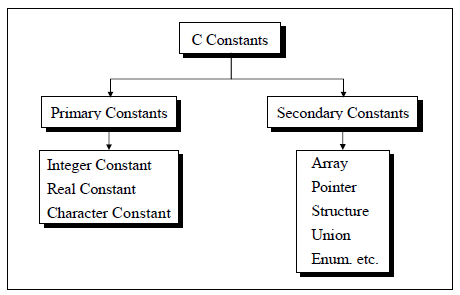
The most common type. Whole numbers with no decimal point.
Decimal (base 10):
const int MAX_ATTEMPTS = 3;
const int DAYS_IN_YEAR = 365;
Octal (base 8, C only): Preceded by 0
const int OCTAL_VAL = 035; // Decimal: 29Hexadecimal (base 16, C only): Preceded by 0x
const int HEX_VAL = 0x1F;     // Decimal: 31
const int COLOR_RED = 0xFF0000; // Red in RGB hexNumbers with decimal points, used for measurements, scientific values, and prices.
PI = 3.14159265358979
GRAVITY = 9.81        # m/s^2
SPEED_OF_LIGHT = 3e8  # 300,000,000 m/s in scientific notation
const float TAX_RATE = 0.18;
const double EULER_NUMBER = 2.718281828;
const double AVOGADRO = 6.022e23; // Scientific notationIn C, a single character enclosed in single quotes. Every character constant has an associated integer value defined by the ASCII standard.
const char GRADE_PASS = 'P';
const char NEWLINE = '\\n';
const char TAB = '\\t';
const char NULL_CHAR = '\\0';

printf("%c\\n", GRADE_PASS);  // P
printf("%d\\n", GRADE_PASS); // 80 (ASCII value of 'P')A sequence of characters representing text.
APP_NAME = "MyApp"
BASE_URL = "<https://api.example.com>"
ERROR_MESSAGE = "Something went wrong. Please try again."
const APP_NAME = "MyApp";
const BASE_URL = "<https://api.example.com>";
const VERSION = "2.0.1";const char APP_NAME[] = "MyApp";
const char *BASE_URL = "<https://api.example.com>";True or false values, often used as feature flags or configuration options.
IS_DEBUG_MODE = False
ENABLE_NOTIFICATIONS = True
ALLOW_GUEST_ACCESS = False
const IS_DEBUG_MODE = false;
const ENABLE_NOTIFICATIONS = true;final boolean IS_DEBUG_MODE = false;
final boolean ENABLE_NOTIFICATIONS = true;C supports special character constants that represent characters which cannot be typed directly. They are written with a backslash and count as a single character.
Escape Sequence | Meaning |
|---|---|
| New line |
| Horizontal tab |
| Carriage return |
| Backslash |
| Single quote |
| Double quote |
| Null character |
| Alert (bell) |
| Backspace |
printf("Name:\\tAlice\\n");    // Tab before Alice, newline at end
printf("She said\\"Hi\\"\\n"); // Quotes inside the string
Declaring Constants in Different Languages
.png)
Python has no built-in const keyword. Instead, the community convention is to write constants in UPPERCASE with underscores. This signals to other developers that the value should not be changed, but Python itself will not stop anyone from reassigning it.
# Convention: UPPERCASE names for constants
PI = 3.14159
MAX_LOGIN_ATTEMPTS = 3
DATABASE_URL = "postgresql://localhost:5432/mydb"
SUPPORTED_LANGUAGES = ["en", "fr", "de", "es"]

# Python won't stop this (no enforcement)
PI = 0   # No error, but violates the convention
For stricter enforcement in Python, you can use the typing module’s Final annotation (Python 3.8+):
from typing import Final

PI: Final = 3.14159
MAX_ATTEMPTS: Final[int] = 3

# Type checkers like mypy will flag this as an error
PI = 0  # mypy error: Cannot assign to final name "PI"
Note:
Finaldoes not prevent reassignment at runtime. It is a hint for static analysis tools and IDEs, which will highlight the violation. The actual enforcement relies on developer discipline and code review.
JavaScript provides the const keyword, introduced in ES6 (2015). It prevents reassignment of the variable binding, though it does not make objects or arrays deeply immutable.
// Primitive constants: fully immutable
const PI = 3.14159;
const MAX_SIZE = 100;
const APP_NAME = "MyApp";

// Trying to reassign throws a TypeError
PI = 3;  // TypeError: Assignment to constant variable

// Object constants: the binding is constant, but the content can change
const CONFIG = { theme: "dark", language: "en" };
CONFIG.theme = "light";   // This WORKS: we changed the content, not the binding
CONFIG = {};              // TypeError: this tries to reassign the binding
Key Insight: In JavaScript,
constprevents you from pointing the variable at a different value. It does not freeze the contents of objects or arrays. To make an object truly immutable, useObject.freeze().const CONFIG = Object.freeze({ theme: "dark", language: "en" }); CONFIG.theme = "light"; // Silently fails (or throws in strict mode) console.log(CONFIG.theme); // Still "dark"
Java uses the final keyword to declare constants. When combined with static, it creates a class-level constant shared by all instances.
// Local constant (inside a method)
final int MAX_RETRIES = 3;

// Class-level constant (shared across all instances)
public class MathConstants {
    public static final double PI = 3.14159265358979;
    public static final double E = 2.71828182845904;
    public static final int MAX_INT_VALUE = Integer.MAX_VALUE;
}

// Using a class-level constant
double area = MathConstants.PI * radius * radius;
Java Convention: Class-level constants are always declared public static final and named in SCREAMING_SNAKE_CASE. This is the most widely followed convention in Java codebases worldwide.
C: const Keyword
#include<stdio.h>

int main() {
    const int MAX_ATTEMPTS = 3;
    const double TAX_RATE = 0.18;
    const char GRADE = 'A';

    printf("Max attempts:%d\n", MAX_ATTEMPTS);
    printf("Tax rate:%.2f\n", TAX_RATE);

    // Trying to modify: compiler error
    MAX_ATTEMPTS = 5;  // error: assignment of read-only variable

    return 0;
}
Important: In C, a
constvariable must be initialised at the time of declaration. If you declare it without a value, it holds whatever garbage was previously in that memory location, and you can never set it afterward.const int x; // Declared but not initialised x = 10; // Error: cannot assign to read-only variable // x now has an unpredictable garbage value forever
C: #define Directive
#include<stdio.h>

#define PI3.14159
#define MAX_USERS1000
#define APP_NAME"MyApp"
#define SQUARE(x)((x)*(x))// Macro with parameter

int main() {
    printf("PI:%.5f\n", PI);
    printf("Max users:%d\n", MAX_USERS);
    printf("App:%s\n", APP_NAME);
    printf("Square of 5:%d\n", SQUARE(5));  // 25
    return 0;
}
When to use
constvs#definein C:Prefer
constin almost all cases. It provides type checking, respects scope, and appears in the debugger with its name. Use#defineonly for function-like macros or when you need the value to be available before any code runs (such as in array size declarations in older C standards).
Constants and literals are closely related but meaningfully different. Beginners often confuse them.
A literal is a raw value written directly in code. It has no name.
A constant is a named label that holds a literal value.
# 3.14159 is a literal: a raw value with no name
area = 3.14159 * radius * radius

# PI is a constant: a named label pointing to the literal 3.14159
PI = 3.14159
area = PI * radius * radius
Feature | Constant | Literal |
|---|---|---|
Has a name | Yes | No |
Can be referenced by name | Yes | No |
Defined using a keyword | Yes ( | No |
Has a memory address (C) | Yes | No (except string literals) |
Is an lvalue | Yes | No |
Example |
|
|
Why this distinction matters: If you write
20000directly in your code fifty times, and the value needs to change, you must find and update all fifty occurrences. If you defineMAX_WITHDRAWAL = 20000once and reference it fifty times, you update one line. The literal20000is a “magic number”, a raw value whose meaning is not immediately clear to anyone reading the code. The constantMAX_WITHDRAWALcommunicates intent.
Good naming is what makes constants genuinely useful. A constant named x is almost as unhelpful as a magic number.
Across Python, Java, C, and C++, the near-universal convention for constants is all uppercase letters with words separated by underscores. This is called SCREAMING_SNAKE_CASE
# Python
MAX_LOGIN_ATTEMPTS = 3
DEFAULT_TIMEOUT_SECONDS = 30
BASE_API_URL = "https://api.example.com"
JavaScript: SCREAMING_SNAKE_CASE for True Constants
In JavaScript, const is used for everything that should not be reassigned, including loop variables or local references that simply happen to not change. For values that are semantically constants (fixed throughout the program), the SCREAMING_SNAKE_CASE naming signals true constants.
// True constant: meaningful, fixed value, SCREAMING_SNAKE_CASE
const MAX_RETRY_COUNT = 3;
const BASE_URL = "<https://api.example.com>";

// `const` used for a local reference that just won't change
const user = fetchUser();       // camelCase: not a semantic constant
const result = compute(data); // camelCase: not a semantic constantBe descriptive: MAX_LOGIN_ATTEMPTS is better than MAX or M
Include the unit where relevant: TIMEOUT_SECONDS is clearer than just TIMEOUT
Include context: DB_MAX_CONNECTIONS is clearer than MAX_CONNECTIONS if other maximums exist
Avoid abbreviations: NUMBER_OF_RETRIES is clearer than NUM_RETRIES or NR
# Bad constant names
T = 30            # What is T?
MAX = 100         # Max what?
URL = "..."       # Which URL?

# Good constant names
TIMEOUT_SECONDS = 30
MAX_FILE_SIZE_MB = 100
BASE_API_URL = "<https://api.example.com>"Just like variables, constants have a scope: the region of the program where they can be accessed.
Defined outside all functions, accessible everywhere in the file (or the entire program with the right setup).
# Global constants at the top of the file
MAX_RETRIES = 3
BASE_URL = "https://api.example.com"

def fetch_data():
    print(f"Fetching from{BASE_URL}")  # Accessible here

def process():
    for i in range(MAX_RETRIES):        # Accessible here too
        print(f"Attempt{i + 1}")
Defined inside a function or block. Only accessible within that function.
def calculate_circle_area(radius):
    PI = 3.14159   # Local constant, only exists inside this function
    return PI * radius * radius
Best Practice: Declare constants as close to where they are used as possible. If a constant is only needed in one function, make it local. If it is used across many functions, make it global. Avoid creating a massive global constants file with every constant in the program unless they are genuinely shared across the entire application.
In Java, class-level constants are the most common pattern. They belong to the class itself, not to any instance of the class.
public class Circle {
    public static final double PI = 3.14159265358979;
    public static final double TWO_PI = 2 * PI;

    private double radius;

    public Circle(double radius) {
        this.radius = radius;
    }

    public double getArea() {
        return PI * radius * radius;
    }

    public double getCircumference() {
        return TWO_PI * radius;
    }
}

// Accessing the constant from outside the class
System.out.println(Circle.PI);  // 3.14159265358979
Constants in Python Classes
class PaymentConfig:
    MAX_TRANSACTION_AMOUNT = 50000
    MIN_TRANSACTION_AMOUNT = 10
    CURRENCY = "INR"
    GATEWAY_URL = "https://payment.example.com"

# Accessing class constants
print(PaymentConfig.MAX_TRANSACTION_AMOUNT)  # 50000
print(PaymentConfig.CURRENCY)               # INR
enum for Related ConstantsWhen you have a group of related constants (like the days of the week, status codes, or directions), an enumis often cleaner than separate constants.
from enum import Enum

class Direction(Enum):
    NORTH = "north"
    SOUTH = "south"
    EAST = "east"
    WEST = "west"

class HttpStatus(Enum):
    OK = 200
    NOT_FOUND = 404
    INTERNAL_ERROR = 500

# Using enums
current_direction = Direction.NORTH
print(current_direction.value)  # north

status = HttpStatus.OK
print(status.value)  # 200
When to use enums over constants: If you have a fixed set of related values where only those specific values are valid (like the four directions, or HTTP status categories), use an enum. It prevents you from accidentally passing an invalid value. For a standalone fixed value like
MAX_FILE_SIZE, a simple constant is cleaner.
Feature | Python | JavaScript | Java | C |
|---|---|---|---|---|
Keyword for constants | None (convention only) |
|
|
|
Preprocessor constants | No | No | No |
|
Compile-time enforcement | No (interpreted) | Yes (parse-time) | Yes | Yes |
Type safety | Duck typed | Dynamic | Fully typed | Fully typed |
Naming convention |
|
|
|
|
Class-level constants | Class attributes | Static class properties |
| Not directly (use |
Object mutability with const | N/A (no const) | Object content still mutable | Reference immutable only | Content immutable |
Enforced at runtime? | No | Binding only | Binding only | Yes (memory is read-only) |
Enum support |
|
| Buil-in |
|
Scope | Module/function | Block | Block/class | Block/file |
Debugger visibility | Yes | Yes | Yes | Yes (unlike |
Python relies entirely on convention. Writing PI = 3.14159 in uppercase signals to other developers that it should not be changed, but nothing prevents reassignment. Use Final from typing if you want static analysis tools to catch violations.
JavaScript const locks the binding (you cannot point the name at a different value) but does not lock the content of objects or arrays. For truly immutable objects, use Object.freeze().
Java final prevents reassignment of the variable. For class-wide constants, combine with static. Java’s enum type is the cleanest way to group related constants.
C offers two mechanisms: const (type-safe, scoped, visible in debugger) and #define (no type, no scope, preprocessor substitution). Modern C code strongly prefers const. #define is reserved for macros and cases where a preprocessor constant is genuinely needed.
Constants are baked into every serious software system. Here are the places you encounter them every day without realising it.
Every financial application has constants for regulatory or business rules that must not accidentally change.
MAX_DAILY_WITHDRAWAL = 20000      # INR
MAX_TRANSACTION_AMOUNT = 100000   # INR
MIN_BALANCE_REQUIRED = 1000       # INR
INTEREST_RATE_SAVINGS = 0.035     # 3.5%
Scientific simulations and engineering software rely on precise physical constants.
SPEED_OF_LIGHT = 299_792_458      # m/s
PLANCK_CONSTANT = 6.626e-34       # J.s
AVOGADRO_NUMBER = 6.022e23        # mol^-1
GRAVITATIONAL_CONSTANT = 6.674e-11 # N.m^2/kg^2
BOLTZMANN_CONSTANT = 1.380e-23    # J/K
Every web application has environment-specific constants for URLs, timeouts, and feature flags.
const BASE_API_URL = "https://api.example.com/v2";
const REQUEST_TIMEOUT_MS = 5000;
const MAX_FILE_UPLOAD_SIZE_MB = 10;
const SUPPORTED_IMAGE_FORMATS = ["jpg", "png", "webp"];
const SESSION_EXPIRY_HOURS = 24;
Games use constants for physics values, scoring rules, and gameplay parameters.
GRAVITY = 9.81            # m/s^2
PLAYER_MAX_HEALTH = 100
PLAYER_MAX_SPEED = 5.0    # units per frame
JUMP_FORCE = 15.0
ENEMY_SPAWN_INTERVAL = 30 # seconds
MAX_PLAYERS = 4
COIN_VALUE = 10
Security-critical software encodes policies as constants to prevent accidental weakening.
PASSWORD_MIN_LENGTH = 8
PASSWORD_MAX_ATTEMPTS = 5
LOCKOUT_DURATION_MINUTES = 30
TOKEN_EXPIRY_MINUTES = 15
MAX_REQUEST_RATE_PER_MINUTE = 100
Rather than remembering that 404 means “not found,” constants give error codes meaningful names.
HTTP_OK = 200
HTTP_CREATED = 201
HTTP_BAD_REQUEST = 400
HTTP_UNAUTHORIZED = 401
HTTP_NOT_FOUND = 404
HTTP_INTERNAL_ERROR = 500
Readability: A constant named MAX_LOGIN_ATTEMPTS communicates intent instantly; the raw number 3 does not
Maintainability: When a fixed value needs to change, update one definition instead of hunting through every file
Safety: The language prevents accidental modification, eliminating an entire class of bugs
Self-documenting code: Well-named constants reduce the need for comments explaining what a number means
Compiler Optimization: The compiler can inline constant values and fold constant expressions, often producing faster code than you would get with variables
Debugger support: Unlike #define macros, const variables appear in the debugger with their name, making inspection easier
Language inconsistency: const means different things in different languages. In JavaScript, it only prevents rebinding. In C, it makes memory read-only. Assuming they are equivalent is a common mistake
Shallow immutability: In JavaScript (without Object.freeze()) and Python, constants that hold objects or arrays still allow internal mutation
No runtime enforcement in Python: The UPPERCASE convention relies entirely on developer discipline. Nothing in Python prevents another developer from assigning a new value to a “constant”
#define pitfalls in C: Without parentheses in macro definitions, operator precedence causes subtle bugs in expressions. #define DOUBLE(x) x + x fails for DOUBLE(3) * 2 because it expands to 3 + 3 * 2 = 9 instead of 12. Always wrap macro expressions in parentheses
Over-constantification: Making every value a named constant, even genuinely arbitrary ones like loop counters, adds clutter without benefit. Use judgment about what deserves a constant name
Constants look like a small feature but their impact on code quality is significant. Here is a recap of everything covered:
A constant is a named value that cannot be changed after it is defined, enforced by the language (or by convention in Python)
At the machine level, const variables are marked as read-only in memory. #define macros in C are handled by the preprocessor before compilation, substituting the value directly into code.
Constants come in many types: integer, floating-point, character, string, and boolean, with C additionally supporting octal and hexadecimal integer constants and escape sequence character constants.
Python uses convention (UPPERCASE) with no language enforcement. JavaScript const prevents rebinding but not object mutation. Java final prevents reassignment, and static final creates class-wide constants. C offers both const (type-safe, scoped) and #define (preprocessor, no type).
Constants vs literals: a literal is a raw value; a constant is a named label for that value. Named constants eliminate magic numbers and make code maintainable.
The universal naming convention is SCREAMING_SNAKE_CASE across all major languages.
Constant folding allows the compiler to evaluate constant expressions at compile time, producing faster code with no sacrifice to readability.
In JavaScript, use Object.freeze() for deeply immutable objects. In C, understand the difference between const int *ptr (immutable value) and int * const ptr (immutable pointer).
The biggest risks are shallow immutability in JavaScript, no enforcement in Python, and #define operator precedence pitfalls in C.
Constants are one of the smallest features in any programming language and one of the highest-return habits you can build. Every magic number you replace with a named constant is a bug prevented, a future change made easier, and a reader saved from confusion.
FAQ